OCPP Authentication Configuration Guide#
For CPO/CSMS operators configuring charger authentication behavior.
Note on Product-Specific Settings#
This guide covers standard OCPP 1.6 configuration settings. When troubleshooting RFID authorization use cases, also consider vendor-specific settings such as FreeVendMode that may affect authorization behavior.
Authentication Priority#
When a charger authenticates a user, it checks sources in this order:
NOTE: Any use of Cst_FreeVendActive = True will override all below and allow all users to charge without authentication.
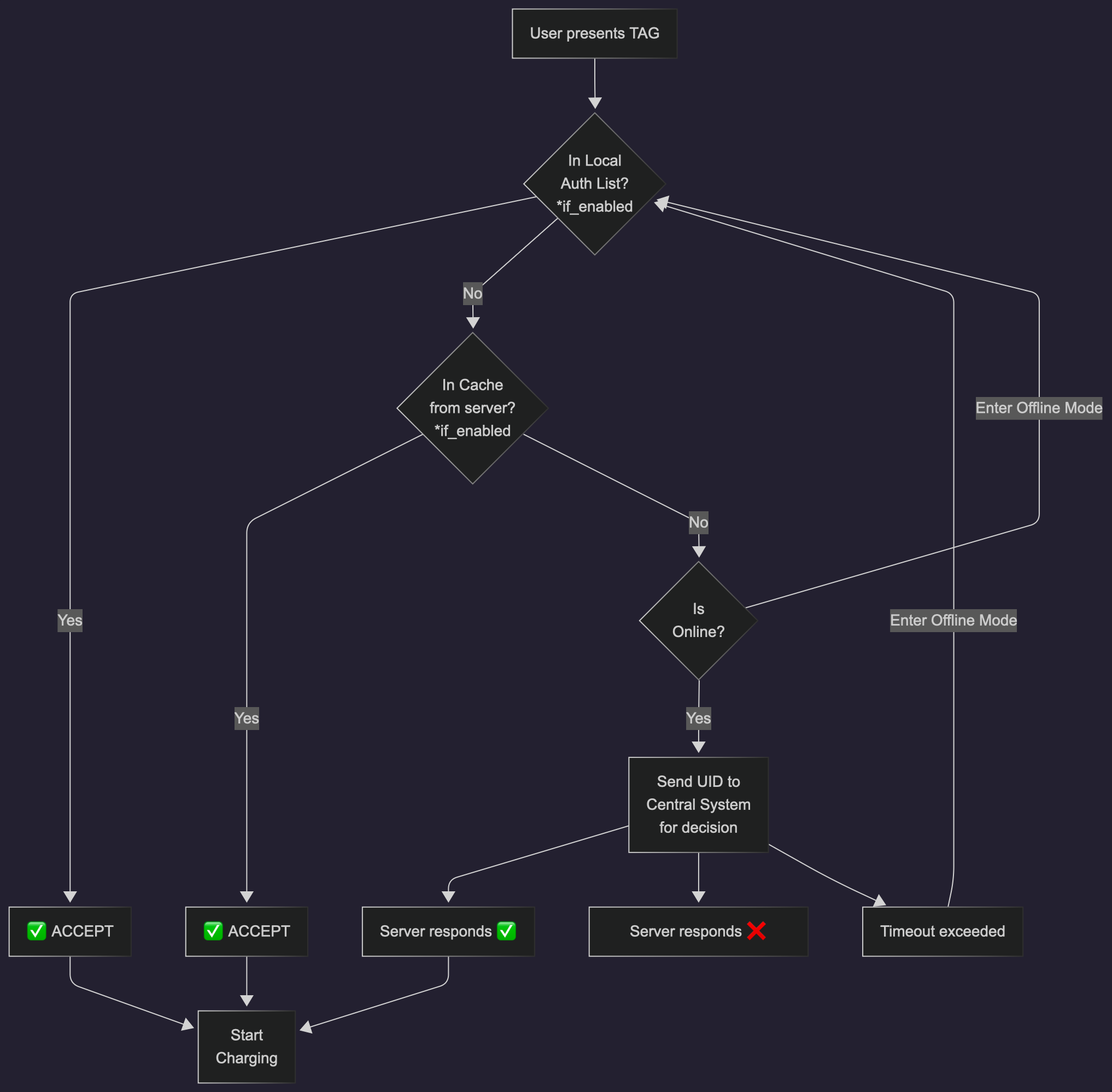
Image 1: Authorization Flow#
Key rule: If a user is on the Local List, the charger never stores them separately in cache. Local List is always checked first.
Detailed Parameter Descriptions#
ConnectionTimeOut (Default: 300 seconds)#
When it matters: During the authorization flow, after a user’s RFID card is tapped and authorization succeeds.
What happens:
User taps RFID card → Authorization request sent to CSMS
CSMS approves → Charger enters “Preparing” state and starts counting down
ConnectionTimeOut timer starts (300 seconds = 5 minutes)
Driver must physically plug the cable into the car within this window
If cable not connected within 300 seconds → Charger automatically cancels the transaction and returns to “Available”
Why it exists: Prevents chargers from staying in “Preparing” state indefinitely while waiting for drivers who change their minds or walk away.
Practical impact: If you reduce this to 60 seconds, drivers have only 1 minute to plug in after tapping their card. If you increase to 600 seconds, they have 10 minutes.
Offline Charger Behavior#
What happens when the charger loses internet connection?
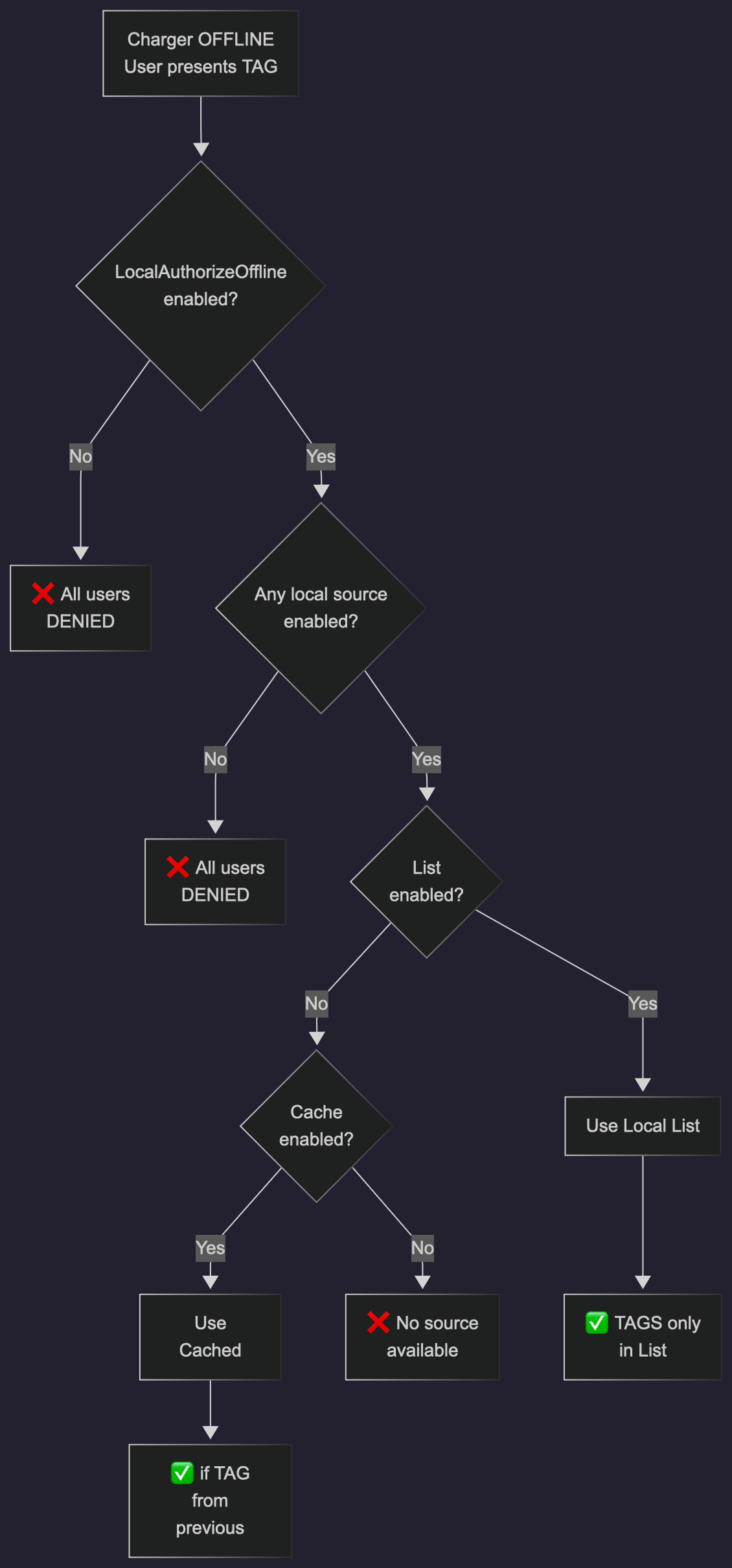
Image 1: Offline Authorization Flow#
Online Charger Behavior#
What happens when the charger is online?
Standard Mode (LocalPreAuthorize = False)#
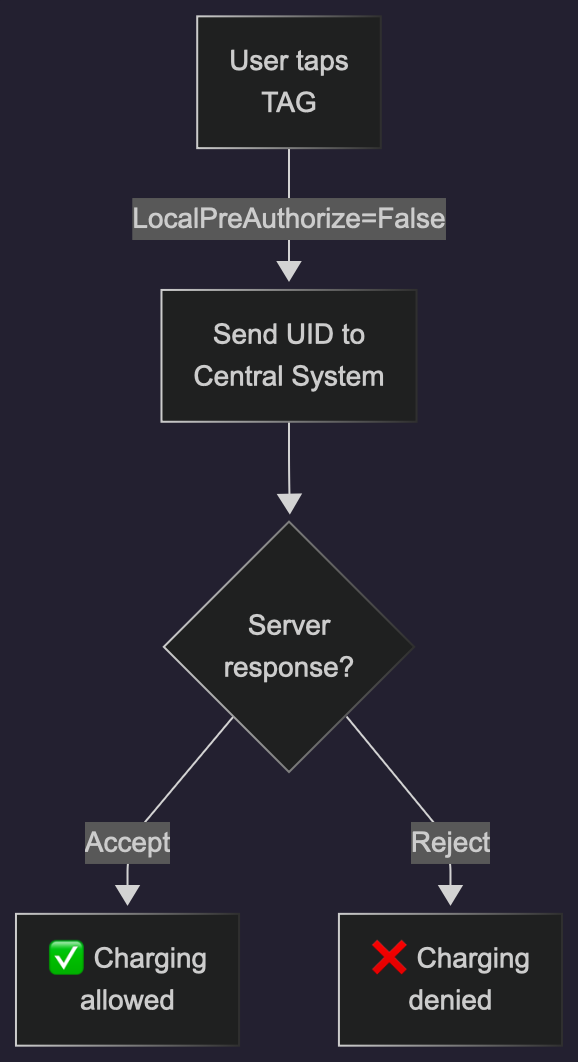
Image 2: Remote Authorization Flow#
Effect: Every authentication goes to your central system. Every decision is current.
Fast Track Mode (LocalPreAuthorize = True)#
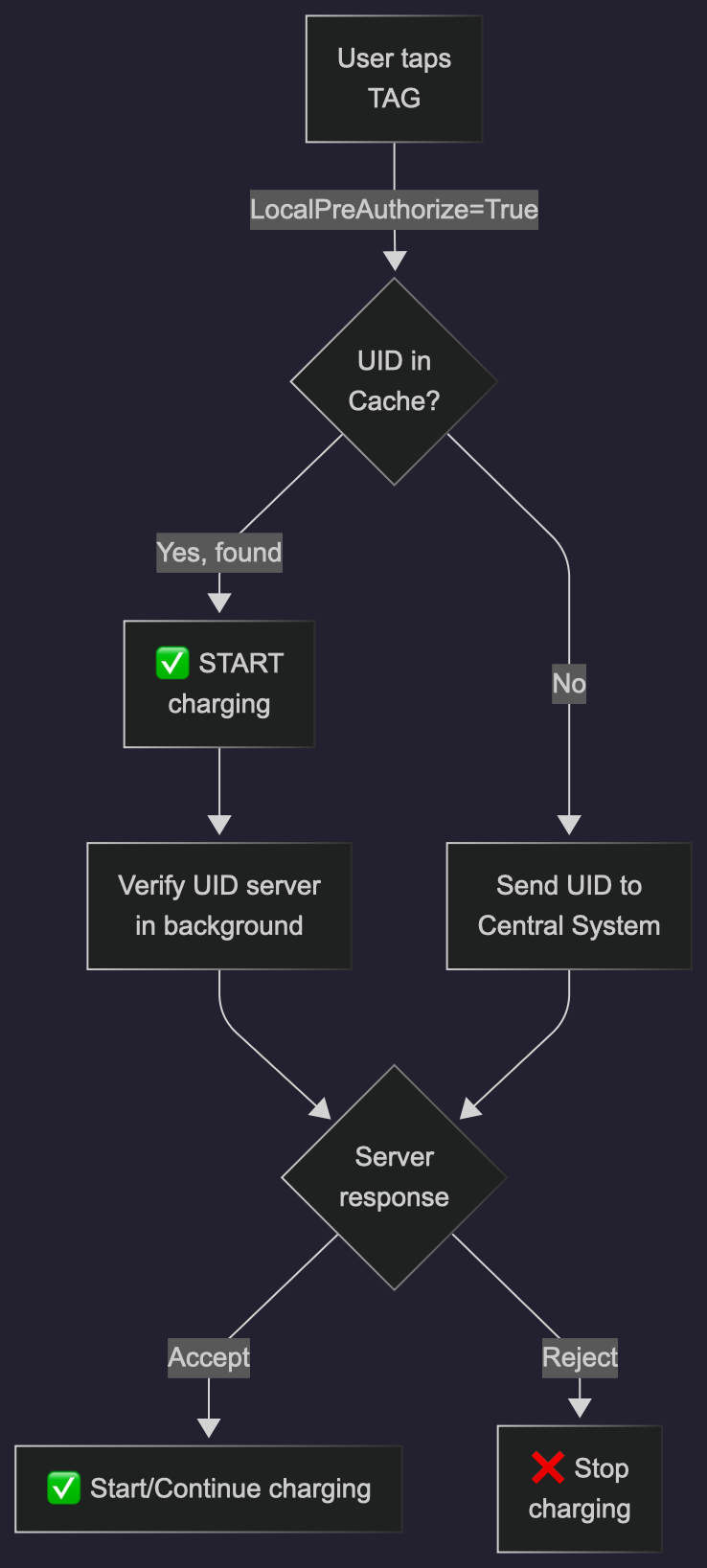
Image 3: Local + Remote Authorization Flow#
Effect: Known users get instant response (fast UX), but system verifies with server. If server disagrees later, charging stops.
Decision Table: When Does Charging Start?#
Charger is OFFLINE#
LocalAuthorizeOffline |
List Enabled |
Cache Enabled |
Result |
|---|---|---|---|
OFF |
- |
- |
❌ No charging |
ON |
OFF |
OFF |
❌ No charging |
ON |
ON |
OFF |
✅ Charging if on List |
ON |
OFF |
ON |
✅ Charging if seen before |
ON |
ON |
ON |
✅ Charging if on List OR seen before |
Charger is ONLINE#
LocalPreAuthorize |
Result |
|---|---|
OFF |
Server decides for every user |
ON |
Known cached users start immediately; server verifies in background |
Practical Scenarios#
Scenario 1: Always Online, Full Server Control#
Use if: Charger always has internet, you want real-time control
LocalAuthorizeOffline: OFF
LocalAuthListEnabled: OFF
AuthorizationCacheEnabled: OFF
LocalPreAuthorize: OFF
Behavior: Every user queried to server in real-time. No offline fallback.
Scenario 2: Offline-Ready with Fixed User List#
Use if: Charger may go offline, you have a fixed set of approved users
LocalAuthorizeOffline: ON
LocalAuthListEnabled: ON
AuthorizationCacheEnabled: OFF
LocalPreAuthorize: OFF
Behavior:
Offline: Only users on your approved list can charge
Online: Server validates, but your list takes priority for conflicts
Cache not used
Scenario 3: Fast-Track for Frequent Users#
Use if: High-traffic location, want instant response for regular users
LocalAuthorizeOffline: ON
LocalAuthListEnabled: ON
AuthorizationCacheEnabled: ON
LocalPreAuthorize: ON
Behavior:
Offline: Uses both approved list and previous users
Online: Frequent users charge instantly (from cache), new users go to server
System learns over time
Scenario 4: Graceful Offline, Open Network#
Use if: Can charge unknown users offline (verify when back online)
LocalAuthorizeOffline: ON
LocalAuthListEnabled: OFF
AuthorizationCacheEnabled: ON
LocalPreAuthorize: OFF
Behavior:
Offline: Anyone can charge (optimistic)
Online: Validates everyone. You decide what to do if server says someone shouldn’t have charged
Special Cases#
What if Local List and Server Disagree?#
If a user is approved locally but server rejects them:
Charger reports the conflict to your system
Action depends on your policy (typically: charger pauses charging, flags for review)
Unknown Users Offline#
Option A: AllowOfflineTxForUnknownId = False (Safe mode)
Only known users can charge offline
Option B: AllowOfflineTxForUnknownId = True (Optimistic mode)
Unknown users can charge offline
When back online, server validates
If validation fails, you choose:
Hard stop: Immediately stop charging
Soft stop: Limit their energy (e.g., max 1 kWh)
Troubleshooting#
Issue |
Check |
|---|---|
Users rejected offline despite being approved |
Is |
Seems too slow to authenticate |
Try |
Same user approved locally but rejected by server |
Check if Local List needs updating from server |
Charger has been offline too long, cache entries stale |
Monitor for old cache entries; periodic sync needed |
Summary#
Offline: Needs
LocalAuthorizeOffline = True+ at least one source (List or Cache)Online Standard: Server validates each user
Online Fast-Track: Cache pre-approves known users, server confirms in background
Local List: Your fixed approved users, highest priority
Cache: Charger’s memory of previous approvals, fallback for offline
Conflicts: When Local List and server disagree, charger ask server for confirmation